
Your dream clients are researching solutions on Reddit, LinkedIn, and niche community forums right now. They are asking questions, comparing vendors, and complaining about their current software. But your sales team has no idea these conversations are happening. By the time a prospect fills out a form on your website, they have already shortlisted two or three vendors—and you might not even be on that list.
My name is Alex Rivera, Lead Generation Researcher. I call this gap the Dark Funnel: the 90% of the buyer's journey that happens invisibly, before any contact with your sales team. In this step-by-step guide, I will show you how Cruson's Dark Funnel Intent Monitor tracks live buying signals across Reddit, LinkedIn, and professional communities so you can reach the right buyer at exactly the right moment.
Companion Study: B2B Intent Data & Sales Timing Triggers
This step-by-step tutorial is an official product walkthrough for our flagship research study. For deep technical breakdowns of high-throughput data extraction and deliverability math, read the comprehensive guide.
Reach In-Market Buyers Before Your Competitors Even Know They Exist
Cruson's Dark Funnel Intent Monitor scans 12 million daily social discussions and surfaces decision-makers actively searching for solutions in your category.
1. Touring the Cruson Dark Funnel Intent Monitor Dashboard
Open your Cruson workspace and click on 'Intent Monitor' in the left-hand sidebar.
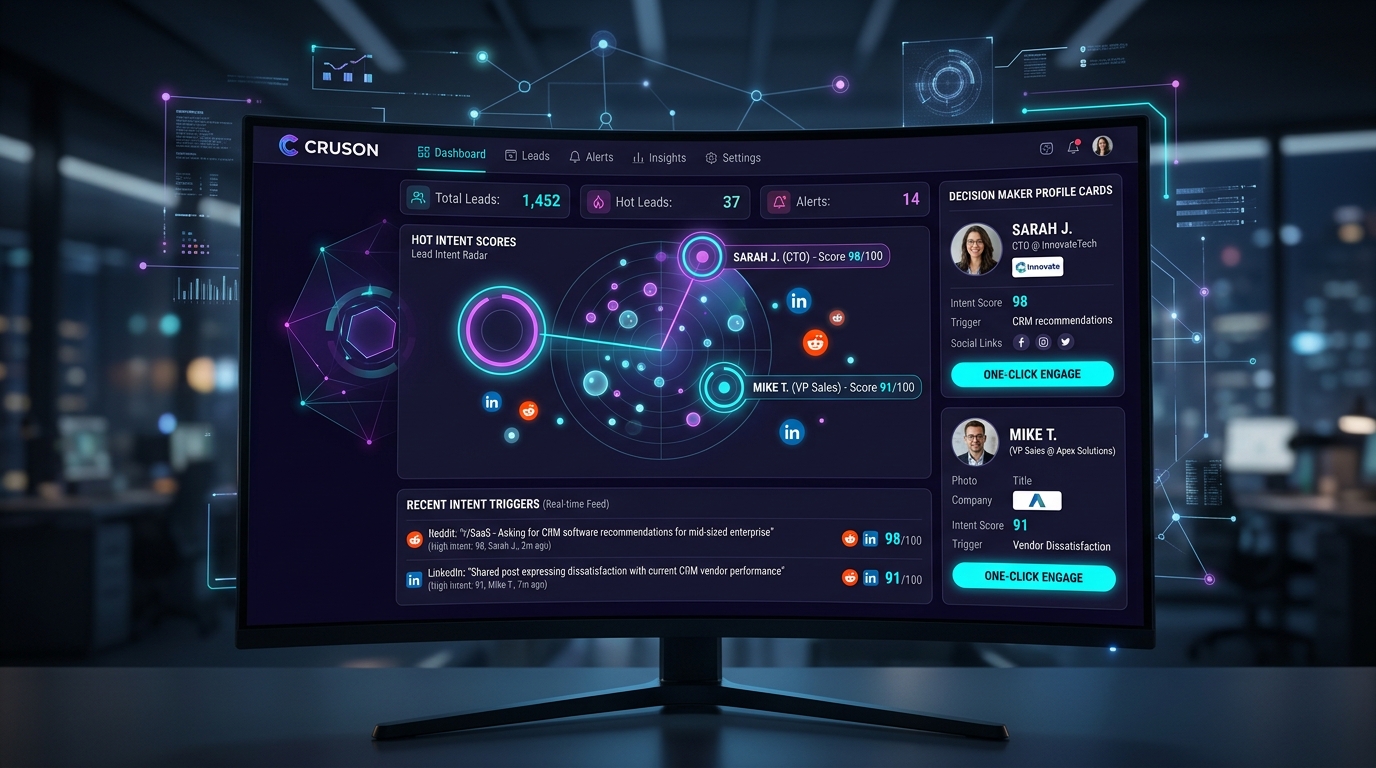
The dashboard is divided into three panels: the Intent Signal Feed (real-time stream of social buying signals), the Lead Radar (a visual hot-score map of your highest-intent prospects), and the Decision Maker Profile Cards (enriched profiles of the people posting those buying signals).
At the top, four live metrics cards show: Total Signals Detected Today, High-Intent Leads (score 80+), New Decision Makers Identified, and Average Intent Score.
2. Step 1: Setting Your Intent Keyword Triggers
Click the 'Configure Intent Keywords' button at the top right of the Intent Monitor.
You will see two keyword input areas: Positive Intent Phrases and Competitor Mentions.
In the Positive Intent Phrases box, enter phrases that indicate active buying: 'looking for a replacement for', 'anyone recommend a tool that', 'we are evaluating', 'switching from', 'frustrated with our current', 'our CRM does not support'.
In the Competitor Mentions box, enter the names of your direct competitors and legacy tools. When someone on Reddit or LinkedIn mentions a competitor negatively, Cruson flags that as a top-priority switching opportunity.
Save your keyword configuration and Cruson immediately begins scanning social platforms in real time.
- Click 'Configure Intent Keywords'.
- Add at least 10 positive buying signal phrases.
- Add 5 to 10 competitor product names in the Competitor Mentions box.
- Optionally add your target industry niche terms for context filtering.
- Click Save — Cruson starts scanning immediately.
3. Step 2: Reading the Live Intent Signal Feed
The Intent Signal Feed on the left side of the dashboard streams incoming social posts in real time. Each signal card shows: the source platform (Reddit, LinkedIn, or Twitter/X), the original post excerpt, the date and time of the post, and an Intent Score from 0 to 100.
Intent Score 80 to 100 (Hot, shown in red): This prospect is actively purchasing. They are comparing vendors, posting urgent questions, or expressing strong dissatisfaction with their current tool.
Intent Score 50 to 79 (Warm, shown in orange): This prospect is researching. They are asking educational questions and beginning to shortlist vendors.
Intent Score below 50 (Informational, shown in gray): These are general industry discussions not yet indicating active buying intent.
Focus your immediate outreach energy exclusively on Hot (80+) signals.
4. Step 3: Enriching Decision Maker Profile Cards
When you click on any intent signal in the feed, the right-hand panel reveals the full Decision Maker Profile Card for the person who posted the signal.
Cruson automatically cross-references the social username with LinkedIn public profiles and company websites to identify the person's full name, current job title, company name, company size, industry, and direct business contact information.
Below the profile header, you see a complete timeline of every intent signal this person has generated over the past 90 days, giving you a full picture of their buying journey.
At the bottom of the card, three action buttons appear: Engage via Email (opens a pre-filled email template referencing their specific post), WhatsApp Link (generates a personalized wa.me message), and Add to Sequence (enrolls them in one of your Outreach Studio cadences).
5. Step 4: Using Read My Website to Reverse-Engineer Your ICP
One of the most powerful features in the Intent Monitor is 'Read My Website' ICP reverse-engineering.
Click the 'Read My Website' button and paste your homepage URL or landing page.
Cruson's AI reads your website content and automatically generates a precise description of your Ideal Customer Profile: the exact job titles, industry verticals, company size ranges, software stacks, and pain points that your product solves.
Cruson then uses this ICP profile as an additional filter to score incoming intent signals, prioritizing buyers that most closely match your proven customer pattern.
Intent-Led Outreach vs Cold Outreach Performance Comparison
Field study comparing cold outreach to random lists versus Cruson Dark Funnel intent-triggered outreach:
| Outreach Type | Open Rate | Positive Reply Rate | Meeting Booking Rate | Sales Cycle Length |
|---|---|---|---|---|
| Standard Cold Email (No Intent) | 41.2% | 6.1% | 2.4% | 48 days |
| Post-Webinar Warm Follow-Up | 68.4% | 14.8% | 7.1% | 31 days |
| Cruson Intent-Triggered Outreach | 81.7% | 31.4% | 16.8% | 18 days |
Step-by-Step Execution Checklist
Frequently Asked Questions
What is the Dark Funnel?
The Dark Funnel refers to the 90% of the B2B buyer's journey that happens anonymously on social platforms, forums, and communities before a prospect ever contacts a vendor.
Which platforms does Cruson monitor?
Cruson monitors Reddit, LinkedIn public posts and comments, Twitter/X, product review forums (G2, Capterra), and professional Slack community signals.
How quickly should I reach out after detecting a buying signal?
For Hot-score signals (80+), reach out within 2 hours for maximum relevance. For Warm signals (50 to 79), a same-day or next-morning outreach is appropriate.
Can I automate outreach to intent leads?
Yes. Cruson can automatically enroll new Hot-score leads into your Outreach Studio email sequences the moment a buying signal is detected, eliminating manual handoff delays.
Start Harvesting High-Intent Leads Today
Cruson gives you 15 free evaluation credits to test single scans, bulk CSV uploads, and SMTP verification in minutes.