
Starting a new software account should feel exciting, not confusing. In this comprehensive Cruson Platform Masterclass, I will walk you through every setting, every feature toggle, and every integration in your workspace so that you can start generating verified leads within the next 15 minutes.
My name is Alex Rivera, Lead Generation Researcher and Data Engineer. I have onboarded hundreds of B2B sales teams onto Cruson, and the teams that get results fastest are the ones who spend 15 minutes setting up their workspace correctly on day one. Let us get your Cruson account fully configured right now, screen by screen.
Companion Study: B2B Email Verification & Contact Data Hygiene Blueprint
This step-by-step tutorial is an official product walkthrough for our flagship research study. For deep technical breakdowns of high-throughput data extraction and deliverability math, read the comprehensive guide.
Get Your First 15 Free Evaluation Credits Instantly
New Cruson accounts receive 15 free test credits to verify email addresses, run web scraping scans, and explore Google Maps harvesting before committing to a plan.
1. Creating Your Cruson Account and Initial Workspace Setup
Visit cruson.com and click the teal 'Get Started Free' button in the top right corner of the navigation bar.
Complete the signup form with your work email address. Cruson does not require a credit card for the free trial.
After email verification, you land on the Workspace Setup Wizard. Set your workspace name (use your company name), select your primary use case from the dropdown (B2B Lead Generation, Data Enrichment, or Agency Client Work), and click 'Create Workspace'.
Your workspace dashboard appears with 15 complimentary evaluation credits already loaded in the top right corner.
- Go to cruson.com and click 'Get Started Free'.
- Enter your work email, create a password, and verify your email inbox.
- Complete the Workspace Setup Wizard with your company name.
- Confirm your 15 free evaluation credits are showing in the top bar.
2. Understanding Cruson Credits and Billing Tiers
Cruson operates on a transparent credit-based billing model. Credits are consumed as you use features: single web scraping scans cost 1 credit per domain, bulk batch jobs cost 1 credit per verified lead, email SMTP verification costs 0.5 credits per address, and Google Maps harvesting costs 1 credit per 10 extracted listings.
Free Trial (15 credits): New accounts receive 15 credits to test all platform features.
Standard Plan (5,000 credits/month): Suitable for individual sales reps and small outbound teams doing 100 to 500 leads per week.
Power User Plan (25,000 credits/month): Ideal for agency operators, sales development teams, and high-volume prospectors.
Enterprise Plan (Custom credits): Dedicated cloud workers, priority API rate limits, and volume pricing for teams processing 100,000+ leads per month.
3. Installing and Using the Cruson Chrome Extension 1-Click Scraper
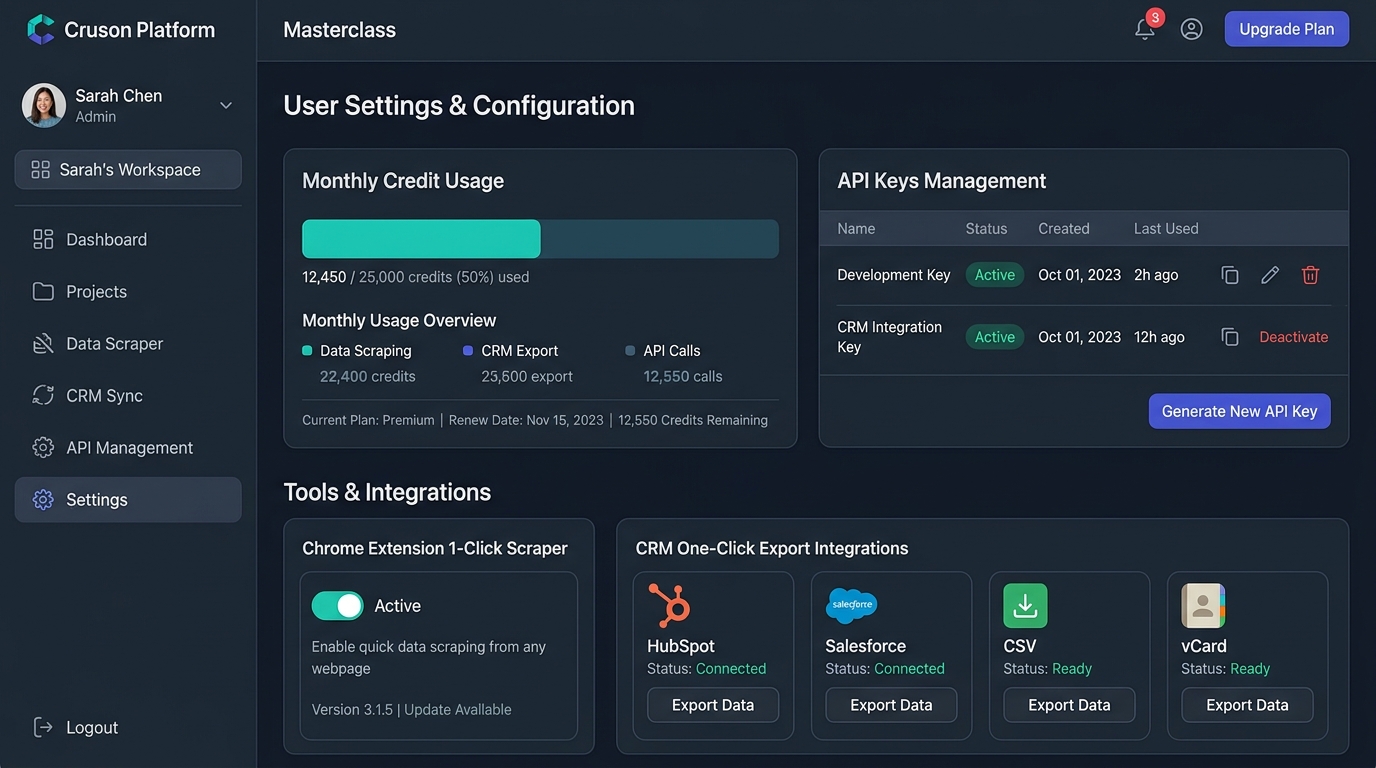
The Cruson Chrome Extension is one of the most powerful time-saving tools in your arsenal. When you visit any company website in your Chrome browser, the extension appears as a small teal icon in your browser toolbar.
To install it, go to your Cruson workspace Settings, click on the 'Chrome Extension' card, and click 'Install from Chrome Web Store'.
Once installed, navigate to any company website. Click the Cruson icon in your toolbar. Within three seconds, a sidebar panel pops up showing the company's extracted name, contact email, phone number, technology stack, and social links.
With one more click, you can save this lead directly to your active workspace list, add them to an Outreach Studio sequence, or copy their verified data to your clipboard.
4. Setting Up CRM Integrations: HubSpot, Salesforce, CSV, vCard & JSON API
Cruson supports five export and integration methods to get your enriched data into your tools of choice.
HubSpot Direct Sync: In Settings → Integrations, click 'Connect HubSpot' and authorize through the HubSpot OAuth popup. Cruson will map Company Name, Contact Email, Phone, and Technology Tags directly into your HubSpot Contact and Company records.
Salesforce Sync: Same process as HubSpot. Cruson maps to Salesforce Lead and Account objects with custom field mapping.
CSV Export: Click 'Export CSV' from any results table. The downloaded spreadsheet uses standardized column headers compatible with Instantly, Apollo, Smartlead, Lemlist, and most popular outreach tools.
vCard (.vcf) Export: For direct mobile contact saving, export individual lead records as vCard files that can be imported into Apple Contacts, Google Contacts, or any mobile CRM.
REST API & JSON Webhooks: In Settings → API Keys, generate a personal API key to query Cruson's extraction and verification endpoints programmatically from your own apps or Zapier workflows.
5. Generating API Keys and Setting Up JSON Webhooks
If you build internal sales tools, use Zapier, or connect Cruson to Make.com workflows, you will need an API key.
In your workspace, navigate to Settings → API Management. Click 'Generate New API Key'.
Give the key a descriptive label (e.g. 'Zapier Integration' or 'Internal Dashboard'). Select the permissions: Read Only (view results), Write (trigger scans), or Admin (full access).
Copy and securely store the generated key. Cruson displays it only once.
You can also set up JSON Webhooks in the same panel. Enter a target URL (your Zapier webhook, your internal API endpoint, or your Make.com trigger URL) and Cruson will POST a JSON payload with every new verified lead as it is extracted in real time.
Cruson Credit Consumption Reference Guide
How credits are consumed across Cruson's key features to help you plan your monthly usage:
| Feature | Credit Cost | Output Per Credit | Best Plan |
|---|---|---|---|
| Single Domain Deep Scan | 1 credit | 1 enriched lead with tech stack | Standard |
| Batch Domain Crawler | 1 credit per lead | Bulk CSV with SMTP verification | Power User |
| Email SMTP Verification | 0.5 credits | 1 verified/invalid email status | Standard |
| Google Maps Harvesting | 1 credit per 10 leads | Business name, phone, email, address | Standard |
| Dark Funnel Intent Scan | 2 credits per day | Daily hot intent signal feed | Power User |
| API Webhook Endpoint | 1 credit per call | Real-time JSON lead payload | Enterprise |
Step-by-Step Execution Checklist
Frequently Asked Questions
Do I need a credit card to try Cruson?
No. Your free trial starts immediately with 15 evaluation credits and no credit card required.
Can I share my Cruson workspace with team members?
Yes. Go to Settings → Team and invite colleagues by email. You can set roles: Admin, Editor, or Viewer.
How do I connect Cruson to Zapier?
Generate an API key in Settings → API Management. In Zapier, use the Webhook trigger to listen for new leads and pipe them into your preferred apps like Slack, Airtable, or your CRM.
What happens when I run out of credits?
Cruson pauses new extraction jobs and sends an email notification when you reach your credit limit. You can upgrade your plan or purchase a one-time credit top-up from the Billing page.
Can I export leads as vCard for mobile contacts?
Yes. Individual lead cards can be exported as .vcf vCard files, which import directly into Apple Contacts, Google Contacts, and Android Contacts.
Related Guides & Resources
- Guide: How to Use Cruson Web Scraping & Tech Detection — Step-by-step walkthrough of the Cruson domain crawler and tech stack detection engine.
- Guide: How to Verify B2B Emails with MX & SMTP — Screen-by-screen guide to verifying mailboxes and keeping bounce rates below 1.5%.
- Guide: Google Maps B2B Lead Harvester — Full walkthrough of the Maps harvester, phone formatting, and 3-Step Email Bridge.
- Guide: Omnichannel WhatsApp Outreach Studio — Build email, WhatsApp, and phone cadences with wa.me links and merge tags.
- Guide: Dark Funnel Intent Monitor — Find in-market buyers on Reddit and LinkedIn before your competitors do.
Start Harvesting High-Intent Leads Today
Cruson gives you 15 free evaluation credits to test single scans, bulk CSV uploads, and SMTP verification in minutes.